16/05/30 17:52:58 INFO spark.SparkContext: Running Spark version 1.6.1
2016-05-30 17:52:58.646 java[7629:1534234] Unable to load realm info from SCDynamicStore
16/05/30 17:52:58 WARN util.NativeCodeLoader: Unable to load native-hadoop library for your platform... using builtin-java classes where applicable
16/05/30 17:52:58 INFO spark.SecurityManager: Changing view acls to: paper
... 중략 ...
16/05/30 17:53:03 INFO scheduler.DAGScheduler: Job 0 finished: count at /Users/paper/dev/git/createXlsFromDb/search_voice_log/voicelog.py:8, took 1.541395 s
14541016/05/30 17:53:03 INFO spark.SparkContext: Invoking stop() from shutdown hook
... 중략 ...
16/05/30 17:53:03 INFO remote.RemoteActorRefProvider$RemotingTerminator: Remoting shut down.
Tool setup (IntelliJ IDEA)
Now that files are hooked up.. let’s connect it in intellij.
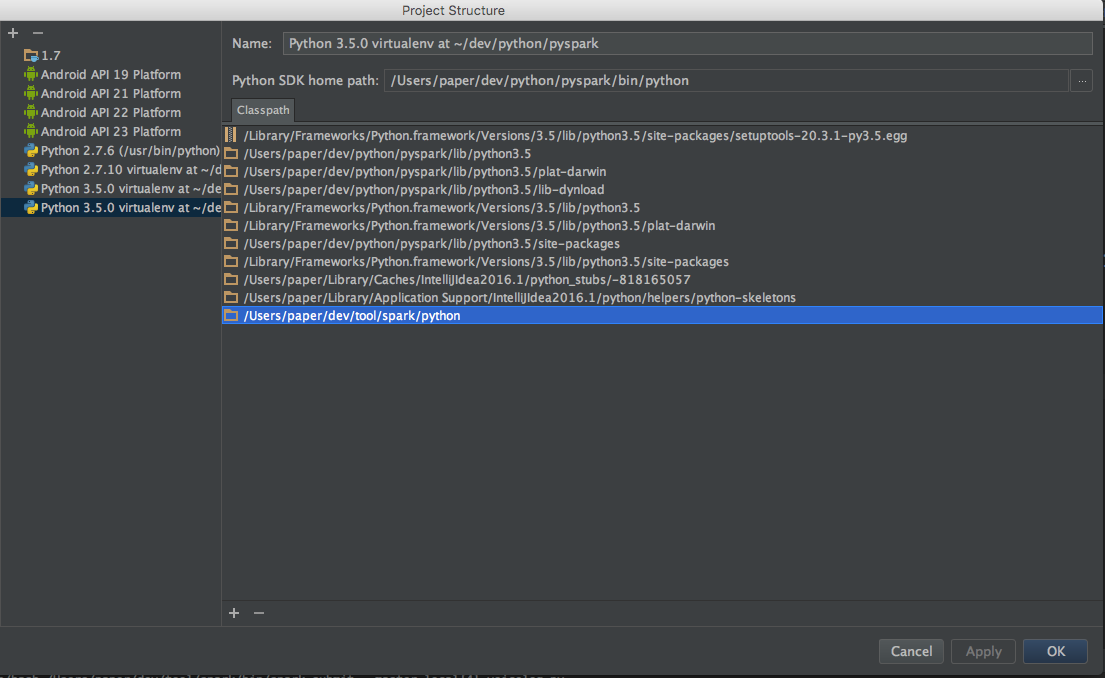
Making pyspark visible in code In project settings, add the library to SDKs as shown below
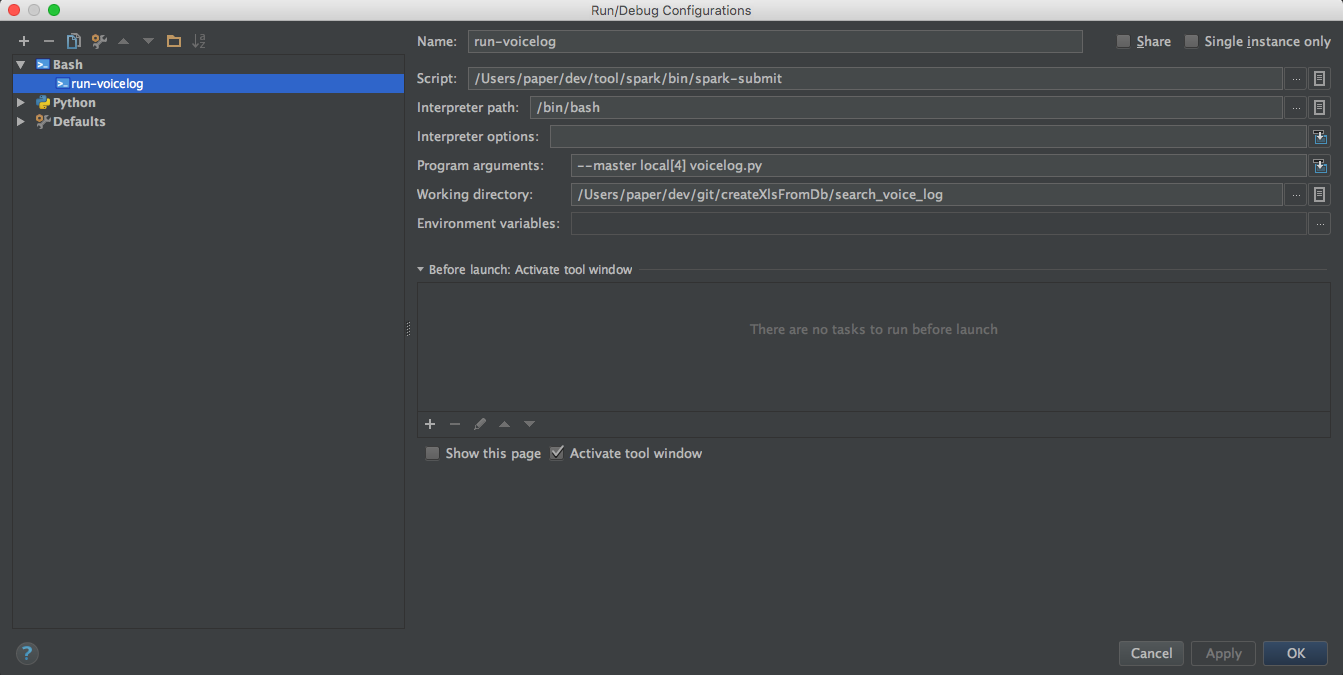
Hooking up the run script
Configure it to run $SPARK_HOME/bin/spark-submit --master local[4] voicelog.py
#-*-coding: utf-8 -*-frompyspark.contextimportSparkContextdefmapLine(line):# lineblock를 불러와서 필요한 부분만 가공하여 tuple형태로 반환한다str=line[1][:line[1].find(".pcm")]str2=str.split("/")sent_cd=str2[1][str2[1].find("_")+1:]data=str2[0]+"/"+sent_cdreturn(data,1)defprintLine(line):print(line)sc=SparkContext(appName="voicelog")# /input/ 경로에 있는 모든 파일을 가져와서 분석을 실시한다 # sc.textFile로 하려고 했으나.분석 대상이 multi line이어서 아래를 이용한다t=sc.newAPIHadoopFile('/input/','org.apache.hadoop.mapreduce.lib.input.TextInputFormat','org.apache.hadoop.io.LongWritable','org.apache.hadoop.io.Text',conf={'textinputformat.record.delimiter':'/text/'})# block중에 record가 포함되지 않고 -11문자열을 포함하는 block만 RDD로 뽑는다l=t.filter(lambdadata:"/record/"notindata[1]and"-11"indata[1])# reduceByKey를 한 이유는 몇번이나 발생했는지를 나타낸다 - 사실 중복제거를 하려고 했는데. groupByKey를 사용해도 괜찮다l=l.map(mapLine).reduceByKey(lambdaa,b:a+b).collect()# 결과 파일에 쓴다f=open("result.log","w")forsinl:f.write("%s, %d\r\n"%(s[0],s[1]))f.close()print("완료")
For reference, spark-submit --help shows many options
Running against a spark server
To set up a cluster and connect, it seems you run spark separately like below and use the spark address in the python code haven’t tried it
1
$SPARK_HOME/sbin/start-all.sh
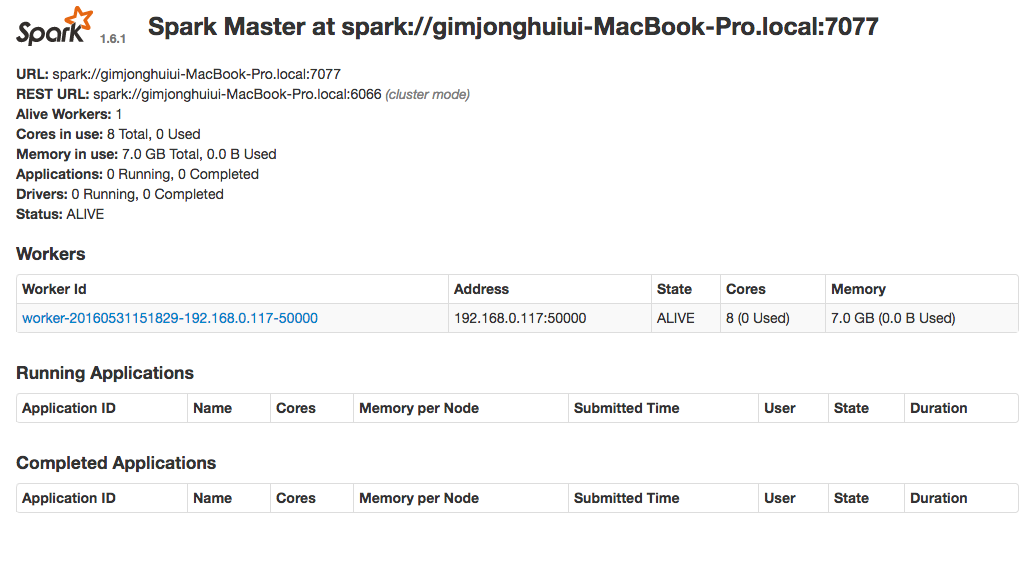
If you look closely at the MasterUI above,
you can see the part starting with URL: spark://.
1
SparkContext("spark://.....","voicelog")
Logs used to be just for error tracing so I had them auto-deleted after a period..
From now on I should keep them Let’s start putting some valuable data in the logs